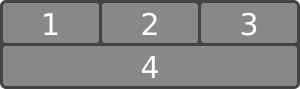
The specification describes a CSS box model optimized for user interface design. In the flex layout model, the children of a flex container can be laid out in any direction, and can “flex” their sizes, either growing to fill unused space or shrinking to avoid overflowing the parent. Both horizontal and vertical alignment of the children can be easily manipulated. Nesting of these boxes (horizontal inside vertical, or vertical inside horizontal) can be used to build layouts in two dimensions.
CSS is a language for describing the rendering of structured documents
(such as HTML and XML)
on screen, on paper, etc.
Status of this document
This is a public copy of the editors’ draft.
It is provided for discussion only and may change at any moment.
Its publication here does not imply endorsement of its contents by W3C.
Don’t cite this document other than as work in progress.
Please send feedback
by filing issues in GitHub (preferred),
including the spec code “css-flexbox” in the title, like this:
“[css-flexbox] …summary of comment…”.
All issues and comments are archived.
Alternately, feedback can be sent to the (archived) public mailing list
www-style@w3.org.
Flexbox Level 1 defined a new layout mode: flex layout.
Flex layout is a powerful, flexible layout mode
for laying out a flex container’s children (flex items)
across one or several lines,
either horizontally or vertically,
and aligning or stretching the items within their line in various ways
that are generally useful for application or whole-page layouts.
This level extends the flex layout model in a number of ways:
flex-wrap: balance allows for flex items to be balanced across lines,
so each line is as similar in length as possible,
avoiding "jagged" lines, particularly on the last line.
1.1.
Overview
This section is not normative.
Flex layout is superficially similar to block layout.
It lacks many of the more complex text- or document-centric properties
that can be used in block layout, such as
floats and
columns.
In return it gains simple and powerful tools
for distributing space and aligning content
in ways that web apps and complex web pages often need.
The contents of a flex container:
can be laid out in any flow direction
(leftwards, rightwards, downwards, or even upwards!)
can have their display order reversed or
'order|rearranged' at the style layer
(i.e., visual order can be independent of source and speech order)
can be laid out linearly along a single (main) axis or
wrapped into multiple lines along a secondary (cross) axis
if multi-line, can be packed tightly onto each line
(similar to standard text line-breaking)
or balanced across the lines
(similar to text-wrap:pretty)
Here’s an example of a catalog where each item has a title, a photo, a description, and a purchase button.
The designer’s intention is that each entry has the same overall size,
that the photo be above the text,
and that the purchase buttons are aligned at the bottom, regardless of the length of the item’s description.
Flex layout makes many aspects of this design easy:
The catalog uses flex layout to lay out rows of items horizontally,
and to ensure that items within a row are all equal-height.
Each entry is then itself a column flex container,
laying out its contents vertically.
Within each entry, the source document content is ordered logically
with the title first, followed by the description and the photo.
This provides a sensible ordering for speech rendering and in non-CSS browsers.
For a more compelling visual presentation, however,
order is used to pull the image up from later in the content to the top,
and align-self is used to center it horizontally.
An auto margin above the purchase button
forces it to the bottom within each entry box,
regardless of the height of that item’s description.
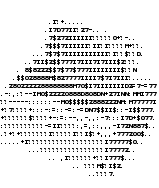
<sectionid="deals"><sectionclass="sale-item"><h1>Computer Starter Kit</h1><p>This is the best computer money can buy, if you don’t have much money.
<ul><li>Computer
<li>Monitor
<li>Keyboard
<li>Mouse
</ul><imgsrc="images/computer.jpg"alt="You get: a white computer with matching peripherals."><button>BUY NOW</button></section><sectionclass="sale-item">
…
</section>
…
</section>
Computer Starter Kit
This is the best computer money can buy,
if you don’t have much money.
Computer
Monitor
Keyboard
Mouse
Printer
Only capable of printing
ASCII art.
Paper and ink not included.
An example rendering of the code above.
1.2.
Module interactions
This module extends the definition of the display property [CSS2],
adding a new block-level and new inline-level display type,
and defining a new type of formatting context
along with properties to control its layout.
None of the properties defined in this module apply to the ::first-line or ::first-letter pseudo-elements.
In addition to the property-specific values listed in their definitions,
all properties defined in this specification
also accept the CSS-wide keywords as their property value.
For readability they have not been repeated explicitly.
2.
Flex Layout Box Model and Terminology
A flex container is the box generated by an element with a
computed display of flex or inline-flex.
In-flow children of a flex container are called flex items
and are laid out using the flex layout model.
Unlike block and inline layout,
whose layout calculations are biased to the block and inline flow directions,
flex layout is biased to the flex directions.
To make it easier to talk about flex layout,
this section defines a set of flex flow–relative terms.
The flex-flow value and the writing mode
determine how these terms map
to physical directions (top/right/bottom/left),
axes (vertical/horizontal), and sizes (width/height).
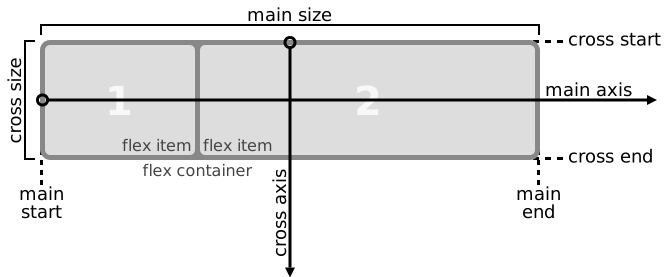
An illustration of the various directions and sizing terms as applied to a row flex container.
main axis
main dimension
The main axis of a flex container is the primary axis along which flex items are laid out.
It extends in the main dimension.
main-start
main-end
The flex items are placed within the container
starting on the main-start side
and going toward the main-end side.
main size
main size property
The main size of a flex container or flex item
refers to its width or height,
whichever is in the main dimension.
Its main size property
is either its width or height property,
whichever is in the main dimension.
Likewise, its min and
max main size properties
are its min-width/max-width or min-height/max-height properties,
whichever are in the main dimension,
and determine its min/max main size.
The axis perpendicular to the main axis is called the cross axis.
It extends in the cross dimension.
cross-start
cross-end
Flex lines are filled with items and placed into the container
starting on the cross-start side of the flex container
and going toward the cross-end side.
cross size
cross size property
The cross size of a flex container or flex item
refers to its width or height,
whichever is in the cross dimension.
Its cross size property
is either its width or height property,
whichever is in the cross dimension.
Likewise, its min and
max cross size properties
are its min-width/max-width or min-height/max-height properties,
whichever are in the cross dimension,
and determine its min/max cross size.
A flex container establishes a new flex formatting context for its contents.
This is the same as establishing a block formatting context,
except that flex layout is used instead of block layout.
For example, floats do not intrude into the flex container,
and the flex container’s margins do not collapse with the margins of its contents.
Flex containers form a containing block for their contents
exactly like block containers do. [CSS2]
The overflow property applies to flex containers.
Flex containers are not block containers,
and so some properties that were designed with the assumption of block layout don’t apply in the context of flex layout.
In particular:
If an element’s specified display is inline-flex,
then its display property computes to flex
in certain circumstances:
the table in CSS 2.1 Section 9.7
is amended to contain an additional row,
with inline-flex in the "Specified Value" column
and flex in the "Computed Value" column.
<divstyle="display:flex"><!-- flex item: block child --><divid="item1">block</div><!-- flex item: floated element; floating is ignored --><divid="item2"style="float: left;">float</div><!-- flex item: anonymous block box around inline content -->
anonymous item 3
<!-- flex item: inline child --><span>
item 4
<!-- flex items do not split around blocks --><qstyle="display: block"id=not-an-item>item 4</q>
item 4
</span></div>
Flex items determined from above code block
Note that the inter-element white space disappears:
it does not become its own flex item,
even though the inter-element text does get wrapped in an anonymous flex item.
Note also that the anonymous item’s box is unstyleable,
since there is no element to assign style rules to.
Its contents will however inherit styles (such as font settings) from the flex container.
A flex itemestablishes an independent formatting context for its contents.
However, flex items themselves are flex-level boxes, not block-level boxes:
they participate in their container’s flex formatting context,
not in a block formatting context.
Note: Some values of display normally trigger the creation of anonymous boxes around the original box.
If such a box is a flex item,
it is blockified first,
and so anonymous box creation will not happen.
For example, two contiguous flex items with display: table-cell
will become two separate display: blockflex items,
instead of being wrapped into a single anonymous table.
In the case of flex items with display: table,
the table wrapper box becomes the flex item,
so the align-self property applies to it.
The contents of any caption boxes contribute to the calculation of
the table wrapper box’s min-content and max-content sizes.
However, like width and height, the flex longhands apply to the table box as follows:
the flex item’s final size is calculated
by performing layout as if the distance between
the table wrapper box’s edges and the table box’s content edges
were all part of the table box’s border+padding area,
and the table box were the flex item.
As it is out-of-flow,
an absolutely-positioned child of a flex container does not participate in flex layout.
The cross-axis edges of the static-position rectangle
of an absolutely-positioned child of a flex container
are the content edges of the flex container.
The main-axis edges of the static-position rectangle
are where the margin edges of the child would be positioned
if it were the sole flex item in the flex container,
assuming both the child and the flex container
were fixed-size boxes of their used size.
(For this purpose,
the child’s auto margins are treated as zero.)
The effect of this is that if you set, for example,
align-self: center; on an absolutely-positioned child of a flex container,
auto offsets on the child will center it in the flex container’scross axis.
Percentage margins and paddings on flex items,
like those on block boxes,
are resolved against the inline size of their containing block,
e.g. left/right/top/bottom percentages
all resolve against their containing block’s width
in horizontal writing modes.
Auto margins expand to absorb extra space in the corresponding dimension.
They can be used for alignment,
or to push adjacent flex items apart.
See Aligning with auto margins.
Flex items paint exactly the same as inline blocks [CSS2],
except that order-modified document order is used in place of raw document order,
and z-index
values other than auto create a stacking context
even if position is static
(behaving exactly as if position were relative).
Note: Descendants that are positioned outside a flex item still participate
in any stacking context established by the flex item.
Specifying visibility:collapse on a flex item
causes it to become a collapsed flex item,
producing an effect similar to visibility:collapse on a table-row or table-column:
the collapsed flex item is removed from rendering entirely,
but leaves behind a "strut" that keeps the flex line’s cross-size stable.
Thus, if a flex container has only one flex line,
dynamically collapsing or uncollapsing items
may change the flex container’s main size, but
is guaranteed to have no effect on its cross size
and won’t cause the rest of the page’s layout to "wobble".
Flex line wrapping is re-done after collapsing, however,
so the cross size of a flex container with multiple lines might or might not change.
Though collapsed flex items aren’t rendered,
they do appear in the formatting structure.
Therefore, unlike on display:none items [CSS2],
effects that depend on a box appearing in the formatting structure
(like incrementing counters or running animations and transitions)
still operate on collapsed items.
In the following example,
a sidebar is sized to fit its content.
visibility: collapse is used to dynamically hide parts of a navigation sidebar
without affecting its width, even though the widest item (“Architecture”)
is in a collapsed section.
Sample live rendering for example code below
Hover over the menu to the left:
each section expands to show its sub-items.
In order to keep the sidebar width (and this main area width) stable,
visibility: collapse is used instead of display: none.
This results in a sidebar that is always wide enough for the word “Architecture”,
even though it is not always visible.
@media(min-width: 60em){/* two column layout only when enough room (relative to default text size) */
div {display: flex;}
#main {flex:1;/* Main takes up all remaining space */
order: 1;/* Place it after (to the right of) the navigation */
min-width: 12em;/* Optimize main content area sizing */}}/* menu items use flex layout so that visibility:collapse will work */
nav > ul > li {display: flex;flex-flow: column;}/* dynamically collapse submenus when not targeted */
nav > ul > li:not(:target):not(:hover) > ul {visibility: collapse;}
To compute the size of the strut, flex layout is first performed with all items uncollapsed,
and then re-run with each collapsed flex item replaced by a strut that maintains
the original cross size of the item’s original line.
See the Flex Layout Algorithm
for the normative definition of how visibility:collapse
interacts with flex layout.
Note: Using visibility:collapse on any flex items
will cause the flex layout algorithm to repeat partway through,
re-running the most expensive steps.
It’s recommended that authors continue to use display:none to hide items
if the items will not be dynamically collapsed and uncollapsed,
as that is more efficient for the layout engine.
(Since only part of the steps need to be repeated when visibility is changed,
however, 'visibility: collapse' is still recommended for dynamic cases.)
4.5.
Automatic Minimum Size of Flex Items
Note: The auto keyword,
representing an automatic minimum size,
is the new initial value of the min-width and min-height properties.
The keyword was previously defined in this specification,
but is now defined in the CSS Sizing module.
For the purpose of calculating an intrinsic size of the box
(e.g. the box’s min-content size),
a content-based minimum size causes the box’s size in that axis to become indefinite
(even if e.g. its width property specifies a definite size).
Note this means that percentages calculated against this size
will behave as auto.
For any purpose other than calculating intrinsic sizes,
a content-based minimum size
(unlike an explicit min-content/etc minimum size)
does not force the box’s size to become indefinite.
However, if a percentage resolved against the box’s size before this minimum was applied,
it must be re-resolved against the new size after it is applied.
Note that while a content-based minimum size is often appropriate,
and helps prevent content from overlapping or spilling outside its container,
in some cases it is not:
In particular, if flex sizing is being used for a major content area of a document,
it is better to set an explicit font-relative minimum width such as min-width: 12em.
A content-based minimum width could result in a large table or large image
stretching the size of the entire content area into an overflow zone,
and thereby making lines of text gratuitously long and hard to read.
Note also, when content-based sizing is used on an item with large amounts of content,
the layout engine must traverse all of this content before finding its minimum size,
whereas if the author sets an explicit minimum, this is not necessary.
(For items with small amounts of content, however,
this traversal is trivial and therefore not a performance concern.)
The contents of a flex container can be laid out in any direction and in any order.
This allows an author to trivially achieve effects that would previously have required complex or fragile methods,
such as hacks using the float and clear properties.
This functionality is exposed through the flex-direction, flex-wrap, and order properties.
Note: The reordering capabilities of flex layout intentionally affect
only the visual rendering,
leaving speech order and navigation based on the source order.
This allows authors to manipulate the visual presentation
while leaving the source order intact for non-CSS UAs and for
linear models such as speech and sequential navigation.
See CSS Display 3 § 3.1 Reordering and Accessibility
and the Flex Layout Overview for examples
that use this dichotomy to improve accessibility.
Authors must not use order or the *-reverse values of flex-flow/flex-direction
as a substitute for correct source ordering,
as that can ruin the accessibility of the document.
The flex-direction property specifies how flex items are placed in the flex container,
by setting the direction of the flex container’s main axis.
This determines the direction in which flex items are laid out.
Note: The reverse values do not reverse box ordering:
like writing-mode and direction[CSS3-WRITING-MODES],
they only change the direction of flow.
Painting order, speech order, and sequential navigation orders
are not affected.
The flex-wrap property controls whether the flex container is single-line or multi-line,
and the direction of the cross-axis,
which determines the direction new lines are stacked in.
The flex container is multi-line,
but the lines are stacked "in reverse" (see below).
balance
The flex container is multi-line,
and attempts to balance the lengths of the flex lines
to be as similar as possible.
balance can be combined with wrap or wrap-reverse
to dictate which direction the flex lines are stacked in.
If neither are specified,
it behaves as if wrap was specified.
The flex-flow property is a shorthand for setting the flex-direction and flex-wrap properties,
which together define the flex container’s main and cross axes.
Some examples of valid flows in an English (left-to-right, horizontal writing mode) document:
div {flex-flow: row;}/* Initial value. Main-axis is inline, no wrapping. (Items will either shrink to fit or overflow.) */
div {flex-flow: column wrap;}/* Main-axis is block-direction (top to bottom) and lines wrap in the inline direction (rightwards). */
div {flex-flow: row-reverse wrap-reverse;}/* Main-axis is the opposite of inline direction (right to left). New lines wrap upwards. */
Note that the flex-flow directions are writing mode sensitive.
In vertical Japanese, for example,
a row flex container lays out its contents from top to bottom,
as seen in this example:
English
Japanese
flex-flow: row wrap;
writing-mode: horizontal-tb;
flex-flow: row wrap;
writing-mode: vertical-rl;
5.4.
Reordering and Accessibility: the order property
Flex items are, by default, displayed and laid out
in the same order as they appear in the source document,
which represents their logical ordering.
This same order is used in rendering to non-visual media
(such as speech),
in the default traversal order of sequential navigation modes
(such as cycling through links,
see e.g. tabindex[HTML]),
and when content is represented in non-CSS UAs.
Note: Since visual perception is two-dimensional and non-linear,
the desired box order is not always the same logical order
used by non-visual media and non-CSS UAs.
Authors must use order only for visual, not logical, reordering of content.
Style sheets that use order to perform logical reordering are non-conforming.
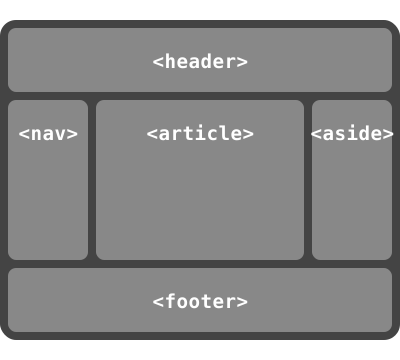
Many web pages have a similar shape in the markup,
with a header on top,
a footer on bottom,
and then a content area and one or two additional columns in the middle.
Generally,
it’s desirable that the content come first in the page’s source code,
before the additional columns.
However, this makes many common designs,
such as simply having the additional columns on the left and the content area on the right,
difficult to achieve.
This has been addressed in many ways over the years,
often going by the name "Holy Grail Layout" when there are two additional columns.
order makes this trivial.
For example, take the following sketch of a page’s code and desired layout:
This layout can be easily achieved with flex layout:
main {display: flex;}
main > article {order:2;min-width:12em;flex:1;}
main > nav {order:1;width:200px;}
main > aside {order:3;width:200px;}
As an added bonus,
the columns will all be equal-height by default,
and the main content will be as wide as necessary to fill the screen.
Additionally,
this can then be combined with media queries to switch to an all-vertical layout on narrow screens:
@media all and (max-width: 600px){/* Too narrow to support three columns */
main {flex-flow: column;}
main > article, main > nav, main > aside {/* Return them to document order */
order: 0;width: auto;}}
(Further use of multi-line flex containers to achieve even more intelligent wrapping left as an exercise for the reader.)
6.
Flex Lines
Flex items in a flex container are laid out and aligned
within flex lines,
hypothetical containers used for grouping and alignment by the layout algorithm.
A flex container can be either single-line or multi-line,
depending on the flex-wrap property:
A single-line flex container
(i.e. one with flex-wrap: nowrap)
lays out all of its children in a single line,
even if that would cause its contents to overflow.
A multi-line flex container
(i.e. one with flex-wrap: wrap or flex-wrap: wrap-reverse)
breaks its flex items across multiple lines,
similar to how text is broken onto a new line when it gets too wide to fit on the existing line.
When additional lines are created,
they are stacked in the flex container along the cross axis
according to the flex-wrap property.
Every line contains at least one flex item,
unless the flex container itself is completely empty.
Additionally, a multi-line flexbox can be
a balanced flex container,
meaning it carefully chooses its linebreaks
to make the line lengths as similar as possible.
(Otherwise, it simply fills the first line, then the second, etc.)
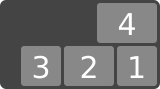
This example shows four buttons that do not fit side-by-side horizontally,
and therefore will wrap into multiple lines.
Since the container is 300px wide, only three of the items fit onto a single line.
They take up 240px, with 60px left over of remaining space.
Because the flex-flow property specifies a multi-line flex container
(due to the wrap keyword appearing in its value),
the flex container will create an additional line to contain the last item.
An example rendering of the multi-line flex container.
Once content is broken into lines,
each line is laid out independently;
flexible lengths and the justify-content and align-self properties only consider the items on a single line at a time.
In a multi-lineflex container (even one with only a single line),
the cross size of each line
is the minimum size necessary to contain the flex items on the line
(after alignment due to align-self),
and the lines are aligned within the flex container with the align-content property.
In a single-lineflex container,
the cross size of the line is the cross size of the flex container,
and align-content has no effect.
The main size of a line is always the same as the main size of the flex container’s content box.
Here’s the same example as the previous,
except that the flex items have all been given flex: auto.
The first line has 60px of remaining space,
and all of the items have the same flexibility,
so each of the three items on that line will receive 20px of extra width,
each ending up 100px wide.
The remaining item is on a line of its own
and will stretch to the entire width of the line, i.e. 300px.
A rendering of the same as above,
but with the items all given flex: auto.
The above examples show three items fitting on a single line,
leaving a single item on the second line.
flex-wrap: balance will instead put two items on the first line,
then two on the second line:
The previous example’s four items,
but now balanced across the two lines
with flex-wrap: balance.
This can have more dramatic effects when flexing items to fill the line,
as the items are more likely to flex similar amounts,
rather than the final line’s items flexing a lot more:
By default, a balance flexbox
will create as many lines as a normal multi-line flexbox,
then rebalance how the flex items are assigned across that many lines.
In some situations,
an author might want to ensure there are always a certain number of lines,
or might be using a flexbox in a way where there is no limit to the line length
(the standard for a column flexbox, with unlimited available height)
and so the "default" line number calculation is useless.
The flex-line-count property specifies a minimum flex line count
that the flex container should create
to balance the items across.
The minimum flex line count is clamped from above
by the number of flex items in the flex container;
it will only create as many lines as there are flex items.
(That is, if you specify flex-line-count: 3
but only have two flex items,
the minimum flex line count is 2, instead.)
Note: There is no maximum flex line count;
the flex container will always contain enough lines
to hold all of its flex items,
which might be more than what flex-line-count specifies.
Unused lines (ones with no flex items assigned to them)
are discarded and do not affect layout.
This only affects non-balance flexboxes.
A balance flexbox will always assign at least one flex item to each line,
and if it has less items than flex-line-count,
that’s handled specially, above.
In addition to setting a minimum number of lines that are used by balance,
flex-line-count changes the available space in the cross axis for flex items:
subtracting the size of N-1 gaps from the normal available space,
then dividing the leftover by N,
where N is the flex-line-count value.
This uses the actual flex-line-count value,
not the minimum flex line count
or the actual number of generated lines
(which can be higher or lower than what is specified).
Percentages continue to resolve as normal,
unaffected by this available space adjustment.
(To have a flex item fill the cross-axisavailable space,
use height: stretch,
rather than height: 100%.)
The defining aspect of flex layout is the ability to make the flex items “flex”,
altering their width/height to fill the available space in the main dimension.
This is done with the flex property.
A flex container distributes free space to its items (proportional to their flex grow factor) to fill the container,
or shrinks them (proportional to their flex shrink factor) to prevent overflow.
The flex property specifies the components of a flexible size:
the flex factors
(grow and shrink)
and the flex basis.
When a box is a flex item,
flex is consulted instead of the main size property
to determine the main size of the box.
If a box is not a flex item,
flex has no effect.
Note: The initial values of the flex longhands are equivalent to
flex: 0 1 auto.
This differs from their defaults when omitted in the flex shorthand
(effectively 1 1 0px)
so that the flex shorthand can better accommodate
the most common cases.
This <number [0,∞]> component sets flex-growlonghand
and specifies the flex grow factor,
which determines how much the flex item will grow
relative to the rest of the flex items in the flex container
when positive free space is distributed.
When omitted, it is set to 1.
Tests
Flex values between 0 and 1 have a somewhat special behavior:
when the sum of the flex values on the line is less than 1,
they will take up less than 100% of the free space.
An item’s flex-grow value
is effectively a request for some proportion of the free space,
with 1 meaning “100% of the free space”;
then if the items on the line are requesting more than 100% in total,
the requests are rebalanced to keep the same ratio but use up exactly 100% of it.
However, if the items request less than the full amount
(such as three items that are each flex-grow: .25)
then they’ll each get exactly what they request
(25% of the free space to each,
with the final 25% left unfilled).
See § 9.8 Resolving Flexible Lengths for the exact details
of how free space is distributed.
This pattern is required for continuous behavior as flex-grow approaches zero
(which means the item wants none of the free space).
Without this, a flex-grow: 1 item would take all of the free space;
but so would a flex-grow: 0.1 item,
and a flex-grow: 0.01 item,
etc.,
until finally the value is small enough to underflow to zero
and the item suddenly takes up none of the free space.
With this behavior,
the item instead gradually takes less of the free space
as flex-grow shrinks below 1,
smoothly transitioning to taking none of the free space at zero.
Unless this “partial fill” behavior is specifically what’s desired,
authors should stick to values ≥ 1;
for example, using 1 and 2 is usually better
than using .33 and .67,
as they’re more likely to behave as intended
if items are added, removed, or line-wrapped.
This <number [0,∞]> component sets flex-shrinklonghand
and specifies the flex shrink factor,
which determines how much the flex item will shrink
relative to the rest of the flex items in the flex container
when negative free space is distributed.
When omitted, it is set to 1.
Tests
Note: The flex shrink factor is multiplied by the flex base size when distributing negative space.
This distributes negative space in proportion to how much the item is able to shrink,
so that e.g. a small item won’t shrink to zero before a larger item has been noticeably reduced.
This component sets the flex-basislonghand,
which specifies the flex basis:
the initial main size of the flex item,
before free space is distributed according to the flex factors.
Tests
Note: This value was not present in the initial release of Flexible Box Layout,
and thus some older implementations will not support it.
The equivalent effect can be achieved by using auto
together with a main size (width or height) of auto.
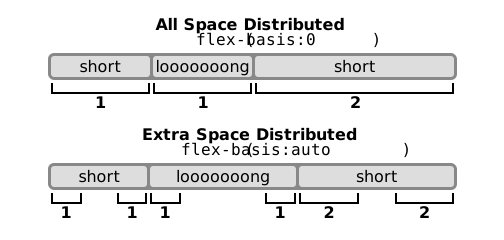
A diagram showing the difference between "absolute" flex
(starting from a basis of zero)
and "relative" flex
(starting from a basis of the item’s content size).
The three items have flex factors of 1, 1, and 2, respectively:
notice that the item with a flex factor of 2 grows twice as fast as the others.
A unitless zero that is not already preceded by two flex factors
must be interpreted as a flex factor.
To avoid misinterpretation or invalid declarations,
authors must specify a zero <'flex-basis'> component
with a unit or precede it by two flex factors.
Equivalent to flex: 0 1 auto. (This is the initial value.)
Sizes the item based on the width/height properties.
(If the item’s main size property computes to auto,
this will size the flex item based on its contents.)
Makes the flex item inflexible when there is positive free space,
but allows it to shrink to its minimum size when there is insufficient space.
The alignment abilities or auto margins
can be used to align flex items along the main axis.
Equivalent to flex: 1 1 auto.
Sizes the item based on the width/height properties,
but makes them fully flexible, so that they absorb any free space along the main axis.
If all items are either flex: auto, flex: initial, or flex: none,
any positive free space after the items have been sized will be distributed evenly to the items with flex: auto.
Equivalent to flex: 0 0 auto.
This value sizes the item according to the width/height properties,
but makes the flex item fully inflexible.
This is similar to initial,
except that flex items are not allowed to shrink,
even in overflow situations.
Equivalent to flex: <number [1,∞]> 1 0.
Makes the flex item flexible and sets the flex basis to zero,
resulting in an item that receives the specified proportion of the free space in the flex container.
If all items in the flex container use this pattern,
their sizes will be proportional to the specified flex factor.
Individual components of flexibility can be controlled by independent longhand properties.
Authors are encouraged to control flexibility using the flex shorthand
rather than with its longhand properties directly,
as the shorthand correctly resets any unspecified components
to accommodate common uses.
Authors are encouraged to control flexibility using the flex shorthand
rather than with flex-grow directly,
as the shorthand correctly resets any unspecified components
to accommodate common uses.
Authors are encouraged to control flexibility using the flex shorthand
rather than with flex-shrink directly,
as the shorthand correctly resets any unspecified components
to accommodate common uses.
Authors are encouraged to control flexibility using the flex shorthand
rather than with flex-basis directly,
as the shorthand correctly resets any unspecified components
to accommodate common uses.
For all values other than auto and content (defined above),
flex-basis is resolved the same way as width in horizontal writing modes [CSS2],
except that if a value would resolve to auto for width,
it instead resolves to content for flex-basis.
For example, percentage values of flex-basis are resolved against
the flex item’s containing block (i.e. its flex container);
and if that containing block’s size is indefinite,
the used value for flex-basis is content.
As another corollary,
flex-basis determines the size of the content box,
unless otherwise specified
such as by box-sizing[CSS3UI].
8.
Alignment
After a flex container’s contents have finished their flexing
and the dimensions of all flex items are finalized,
they can then be aligned within the flex container.
The margin properties can be used to align items in a manner similar to, but more powerful than, what margins can do in block layout.
Flex items also respect the alignment properties from CSS Box Alignment,
which allow easy keyword-based alignment of items in both the main axis and cross axis.
These properties make many common types of alignment trivial,
including some things that were very difficult in CSS 2.1,
like horizontal and vertical centering.
Note: While the alignment properties are defined in CSS Box Alignment[CSS-ALIGN-3],
Flexible Box Layout reproduces the definitions of the relevant ones here
so as to not create a normative dependency that may slow down advancement of the spec.
These properties apply only to flex layout
until CSS Box Alignment Level 3 is finished
and defines their effect for other layout modes.
Additionally, any new values defined in the Box Alignment module
will apply to Flexible Box Layout;
in other words, the Box Alignment module, once completed,
will supersede the definitions here.
Note: If free space is distributed to auto margins,
the alignment properties will have no effect in that dimension
because the margins will have stolen all the free space
left over after flexing.
One use of auto margins in the main axis is to separate flex items into distinct "groups".
The following example shows how to use this to reproduce a common UI pattern -
a single bar of actions with some aligned on the left and others aligned on the right.
Sample rendering of the code below.
The figure below illustrates the difference in cross-axis alignment in overflow situations between
using auto margins
and using the alignment properties.
About
Authoritarianism
Blog
About
Authoritarianism
Blog
The items in the figure on the left are centered with margins,
while those in the figure on the right are centered with align-self.
If this column flex container was placed against the left edge of the page,
the margin behavior would be more desirable,
as the long item would be fully readable.
In other circumstances,
the true centering behavior might be better.
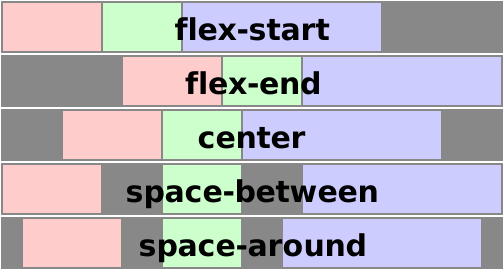
The justify-content property aligns flex items along the main axis of the current line of the flex container.
This is done after any flexible lengths and any auto margins have been resolved.
Typically it helps distribute extra free space leftover when either
all the flex items on a line are inflexible,
or are flexible but have reached their maximum size.
It also exerts some control over the alignment of items when they overflow the line.
flex-start
Flex items are packed toward the start of the line.
The main-start margin edge of the first flex item on the line
is placed flush with the main-start edge of the line,
and each subsequent flex item is placed flush with the preceding item.
Tests
Flex items are packed toward the end of the line.
The main-end margin edge of the last flex item
is placed flush with the main-end edge of the line,
and each preceding flex item is placed flush with the subsequent item.
Tests
Flex items are packed toward the center of the line.
The flex items on the line are placed flush with each other
and aligned in the center of the line,
with equal amounts of space between the main-start edge of the line and the first item on the line
and between the main-end edge of the line and the last item on the line.
(If the leftover free-space is negative,
the flex items will overflow equally in both directions.)
Tests
Flex items are evenly distributed in the line.
If the leftover free-space is negative
or there is only a single flex item on the line,
this value falls back to safe flex-start.
Otherwise,
the main-start margin edge of the first flex item on the line
is placed flush with the main-start edge of the line,
the main-end margin edge of the last flex item on the line
is placed flush with the main-end edge of the line,
and the remaining flex items on the line are distributed
so that the spacing between any two adjacent items is the same.
Tests
Flex items are evenly distributed in the line,
with half-size spaces on either end.
If the leftover free-space is negative or
there is only a single flex item on the line,
this value falls back to safe center.
Otherwise, the flex items on the line are distributed
such that the spacing between any two adjacent flex items on the line is the same,
and the spacing between the first/last flex items and the flex container edges
is half the size of the spacing between flex items.
Tests
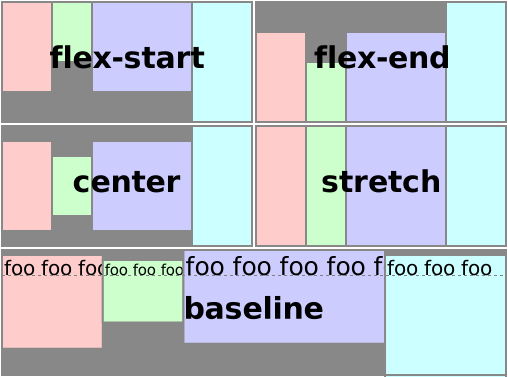
Flex items can be aligned in the cross axis of the current line of the flex container,
similar to justify-content but in the perpendicular direction.
align-items sets the default alignment for all of the flex container’s items,
including anonymous flex items.
align-self allows this default alignment to be overridden for individual flex items.
(For anonymous flex items,
align-self always matches the value of align-items on their associated flex container.)
The flex item’s margin box is centered in the cross axis within the line.
(If the cross size of the flex line is less than that of the flex item,
it will overflow equally in both directions.)
Tests
The flex item participates in baseline alignment:
all participating flex items on the line
are aligned such that their baselines align,
and the item with the largest distance between its baseline and its cross-start margin edge
is placed flush against the cross-start edge of the line.
If the item does not have a baseline in the necessary axis,
then one is synthesized
from the flex item’s border box.
Tests
If the cross size property of the flex item computes to auto,
and neither of the cross-axis margins are auto,
the flex item is stretched.
Its used value is the length necessary to make the cross size of the item’s margin box as close to the same size as the line as possible,
while still respecting the constraints imposed by min-height/min-width/max-height/max-width.
Note: If the flex container’s height is constrained
this value may cause the contents of the flex item
to overflow the item.
The cross-start margin edge of the flex item
is placed flush with the cross-start edge of the line.
The align-content property aligns a flex container’s lines within the flex container
when there is extra space in the cross-axis,
similar to how justify-content aligns individual items within the main-axis.
Note, this property has no effect on a single-lineflex container.
Values have the following meanings:
flex-start
Lines are packed toward the start of the flex container.
The cross-start edge of the first line in the flex container
is placed flush with the cross-start edge of the flex container,
and each subsequent line is placed flush with the preceding line.
flex-end
Lines are packed toward the end of the flex container.
The cross-end edge of the last line
is placed flush with the cross-end edge of the flex container,
and each preceding line is placed flush with the subsequent line.
center
Lines are packed toward the center of the flex container.
The lines in the flex container are placed flush with each other
and aligned in the center of the flex container,
with equal amounts of space
between the cross-start content edge of the flex container
and the first line in the flex container,
and between the cross-end content edge of the flex container
and the last line in the flex container.
(If the leftover free-space is negative,
the lines will overflow equally in both directions.)
space-between
Lines are evenly distributed in the flex container.
If the leftover free-space is negative
or there is only a single flex line in the flex container,
this value falls back to safe flex-start.
Otherwise,
the cross-start edge of the first line in the flex container
is placed flush with the cross-start content edge of the flex container,
the cross-end edge of the last line in the flex container
is placed flush with the cross-end content edge of the flex container,
and the remaining lines in the flex container are distributed
so that the spacing between any two adjacent lines is the same.
space-around
Lines are evenly distributed in the flex container,
with half-size spaces on either end.
If the leftover free-space is negative
this value falls back to safe center.
Otherwise, the lines in the flex container are distributed
such that the spacing between any two adjacent lines is the same,
and the spacing between the first/last lines and the flex container edges
is half the size of the spacing between flex lines.
stretch
Lines stretch to take up the remaining space.
If the leftover free-space is negative,
this value falls back to flex-start.
Otherwise,
the free-space is split equally between all of the lines,
increasing their cross size.
Note: Only multi-lineflex containers
ever have free space in the cross-axis for lines to be aligned in,
because in a single-line flex container
the sole line automatically stretches to fill the space.
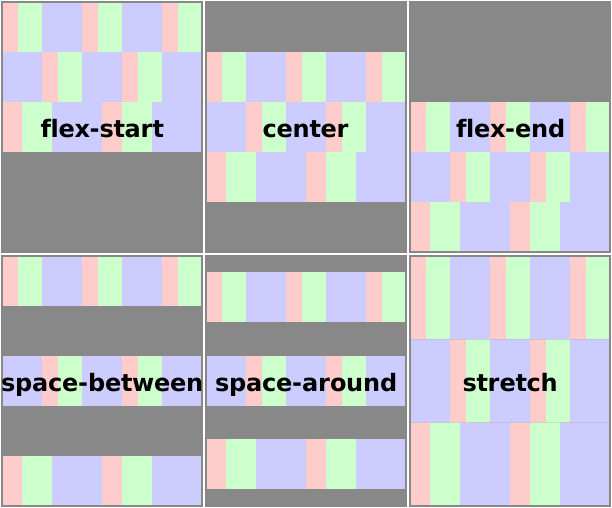
An illustration of the align-content keywords and their effects on a multi-line flex container.
In order for a flex container to itself participate in baseline alignment
(e.g. when the flex container is itself a flex item in an outer flex container),
it needs to submit the position of the baselines that will best represent its contents.
To this end,
the baselines of a flex container are determined as follows
(after reordering with order,
and taking flex-direction into account):
When calculating the baseline according to the above rules,
if the box contributing a baseline has an overflow value that allows scrolling,
the box must be treated as being in its initial scroll position
for the purpose of determining its baseline.
This section contains normative algorithms
detailing the exact layout behavior of a flex container and its contents.
The algorithms here are written to optimize readability and theoretical simplicity,
and may not necessarily be the most efficient.
Implementations may use whatever actual algorithms they wish,
but must produce the same results as the algorithms described here.
Note: This section is mainly intended for implementors.
Authors writing web pages should generally be served well by the individual property descriptions,
and do not need to read this section unless they have a deep-seated urge to understand arcane details of CSS layout.
The following sections define the algorithm for laying out a flex container and its contents.
Generate anonymous flex items
as described in § 4 Flex Items.
9.2.
Line Length Determination
Determine the available main and cross space for the flex items.
For each dimension,
if that dimension of the flex container’s content box is a definite size, use that;
if that dimension of the flex container is being sized under a min or max-content constraint,
the available space in that dimension is that constraint;
otherwise, subtract the flex container’s margin, border, and padding
from the space available to the flex container in that dimension
and use that value.
This might result in an infinite value.
Note: This case occurs, for example,
in an English document (horizontal writing mode)
containing a column flex container
containing a vertical Japanese (vertical writing mode) flex item.
When determining the flex base size,
the item’s min and max main sizes are ignored
(no clamping occurs).
Furthermore, the sizing calculations that floor the content box size at zero
when applying box-sizing are also ignored.
(For example, an item with a specified size of zero,
positive padding, and box-sizing: border-box
will have an outer flex base size of zero—and hence a negative inner flex base size.)
Starting from the first uncollected item,
collect consecutive items one by one
until the first time that the next collected item
would not fit into the flex container’s inner main size
(or until a forced break is encountered,
see § 10 Fragmenting Flex Layout).
If the very first uncollected item wouldn’t fit,
collect just it into the line.
Repeat until all flex items have been collected into flex lines.
Note that the "collect as many" line will collect zero-sized flex items
onto the end of the previous line
even if the last non-zero item exactly "filled up" the line.
First determine how many flex lines will be produced
by the non-balancing algorithm, above.
For this purpose,
floor the outerhypothetical main size of each flex item
at zero.
This can, if the items have large negative margins,
result in a higher line count than a non-balancing flexbox.
Let the balancing line count
be the larger of this line count
and the minimum flex line count.
Determine the hypothetical cross size of each item
by performing layout as if it were an in-flowblock-level box
with the used main size and the given available space,
treating auto as fit-content.
Tests
Collect all the flex items whose inline-axis is parallel to the main-axis,
whose align-self is baseline,
and whose cross-axis margins are both non-auto.
Find the largest of the distances between each item’s baseline and its hypothetical outer cross-start edge,
and the largest of the distances between each item’s baseline and its hypothetical outer cross-end edge,
and sum these two values.
Among all the items not collected by the previous step,
find the largest outer hypothetical cross size.
The used cross size of the flex line is the largest of the numbers found in the previous two steps and zero.
If the flex container is single-line,
then clamp the line’s cross-size to be within
the container’s computed min and max cross sizes.
Note that if CSS 2.1’s definition of min/max-width/height applied more generally,
this behavior would fall out automatically.
Handle 'align-content: stretch'.
If the flex container has a definitecross size,
align-content is stretch,
and the sum of the flex lines' cross sizes is less than the flex container’s inner cross size,
increase the cross size of each flex line by equal amounts
such that the sum of their cross sizes exactly equals the flex container’s inner cross size.
Collapse visibility:collapse items.
If any flex items have visibility: collapse,
note the cross size of the line they’re in as the item’s strut size,
and restart layout from the beginning.
In this second layout round,
when collecting items into lines,
treat the collapsed items as having zero main size.
For the rest of the algorithm following that step,
ignore the collapsed items entirely
(as if they were display:none)
except that after calculating the cross size of the lines,
if any line’s cross size is less than
the largest strut size
among all the collapsed items in the line,
set its cross size to that strut size.
Determine the used cross size of each flex item.
If a flex item’s cross size depends on the available space
in the cross axis,
recalculate its cross size using the flex line’scross size
(rather than the flex container’s) as the available space.
Otherwise,
the used cross size is the item’s hypothetical cross size.
If the flex item’s cross size changed as a result,
redo layout for its contents,
treating this used size as its definite cross size
so that percentage-sized children can be resolved.
Distribute any remaining free space.
For each flex line:
If the remaining free space is positive
and at least one main-axis margin on this line is auto,
distribute the free space equally among these margins.
Otherwise, set all auto margins to zero.
Resolve cross-axis auto margins.
If a flex item has auto cross-axis margins:
If its outer cross size
(treating those auto margins as zero)
is less than the cross size of its flex line,
distribute the difference in those sizes equally
to the auto margins.
Otherwise,
if the block-start or inline-start margin (whichever is in the cross axis)
is auto, set it to zero.
Set the opposite margin so that the outer cross size of the item
equals the cross size of its flex line.
Align all flex items along the cross-axis per align-self,
if neither of the item’s cross-axis margins are auto.
Determine the flex container’s used cross size
using the rules of the formatting context in which it participates.
If a content-based cross size is needed,
use the sum of the flex lines' cross sizes.
To balance flex items
for a flex container
across a number of flex linesline count,
divide its flex items
into exactly line count numbers of contiguous sequences,
under the following conditions:
At least one flex item is assigned to each sequence.
The sum of the flex item sizes
of all the flex items in the sequence
(the line size)
do not exceed the innermain size of the flex container
(unless it’s a single overflowing item).
If a flex item’s size is zero,
the preceding sequence was not overflowing,
and it could be assigned either to the end of the preceding sequence
or the beginning of the next sequence,
it is assigned to the end of the preceding sequence.
Otherwise, it’s assigned to the beginning of the next sequence.
Calling the difference between the line size
and the flex container’sinnermain size
a sequence’s error,
the sum of the squared error across all sequences
is minimized.
If multiple possible sequence assignments
have equal minimum error,
select the sequence that assigns the most items to the first line;
if multiple sequences tie by that metric,
select the sequence among them that assigns the most items to the second line;
etc.
Note: Because all items have zero or positive size,
and thus adding an item to a line never increases the error,
there are efficient, nearly linear algorithms
to minimize the sum of squared error,
such as SMAWK algorithm.
(A naive minimization algo is O(n^2) in the number of items being balanced,
which is not usable in practice.)
9.8.
Resolving Flexible Lengths
To resolve the flexible lengths of the items within a flex line:
Determine the used flex factor.
Sum the outer hypothetical main sizes of all items on the line.
If the sum is less than the flex container’s inner main size,
use the flex grow factor for the rest of this algorithm;
otherwise, use the flex shrink factor.
Each item in the flex line has a target main size,
initially set to its flex base size.
Each item is initially unfrozen
and may become frozen.
Calculate initial free space.
Sum the outer sizes of all items on the line,
and subtract this from the flex container’s inner main size.
For frozen items, use their outer target main size;
for other items, use their outer flex base size.
Loop:
Check for flexible items.
If all the flex items on the line are frozen, exit this loop.
Calculate the remaining free space
as for initial free space, above.
If the sum of the unfrozen flex items’ flex factors is less than one,
multiply the initial free space by this sum.
If the magnitude of this value is less than the magnitude of the remaining free space,
use this as the remaining free space.
If the remaining free space is non-zero,
distribute it proportional to the flex factors:
For every unfrozen item on the line,
find the ratio of the item’s flex grow factor
to the sum of the flex grow factors of all unfrozen items on the line.
Set the item’s target main size to its flex base size
plus a fraction of the remaining free space proportional to the ratio.
For every unfrozen item on the line,
multiply its flex shrink factor by its inner flex base size,
and note this as its scaled flex shrink factor.
Find the ratio of the item’s scaled flex shrink factor
to the sum of the scaled flex shrink factors of all unfrozen items on the line.
Set the item’s target main size to its flex base size
minus a fraction of the absolute value of the remaining free space proportional to the ratio.
Note this may result in a negative inner main size;
it will be corrected in the next step.
Fix min/max violations.
Clamp each non-frozen item’s target main size by
its used min and max main sizes
and floor its content-box size at zero.
If the item’s target main size was made smaller by this,
it’s a max violation.
If the item’s target main size was made larger by this,
it’s a min violation.
Freeze over-flexed items.
The total violation is the sum of the adjustments from the previous step
∑(clamped size - unclamped size).
If the total violation is:
Zero
Freeze all items.
Positive
Freeze all the items with min violations.
Negative
Freeze all the items with max violations.
Note: This freezes at least one item,
ensuring that the loop makes progress and eventually terminates.
Although CSS Sizing [CSS-SIZING-3] defines definite and indefinite lengths,
Flexbox has several additional cases where a length can be considered definite:
Once the cross size of a flex line has been determined,
the cross sizes of items in auto-sized flex containers
are also considered definite for the purpose of layout;
see step 11.
Note: This means that within flex layout,
“definite” sizes can require performing layout.
This was done to allow percentages inside of flex items
to resolve where authors expected them to resolve.
9.10.
Intrinsic Sizes
The intrinsic sizing of a flex container is used
to produce various types of content-based automatic sizing,
such as shrink-to-fit logical widths (which use the fit-content formula)
and content-based logical heights (which use the max-content size).
For these computations, auto margins on flex items are treated as 0.
See [CSS-SIZING-3] for a definition of the terms in this section.
The min-contentmain size of a flex container
is, theoretically, the smallest size the flex container can take
such that no items overflow it,
and no item’s contents overflow the item—setting aside the cases in which the boxes layouts are defined to overflow
(for example with negative margins or percentage sizes that add up to more than 100%).
For the min-content size of a multi-line flex container,
see § 9.10.1.3 Multi-line Min-content Algorithm.
For max-content sizes and for single-line min-content sizes,
an implementation is conformant to CSS Flexible Box Layout
if it conforms to either the Ideal Algorithm or the Web-compatible Algorithm,
as defined below.
9.10.1.1.
Ideal Algorithm: Max-content Size and Min-content Single-line Size
Note: The following algorithm calculates the flex container’s ideal
intrinsic main sizes.
However, because it was not implemented correctly initially,
and existing content became dependent on the (unfortunately consistent) incorrect implemented behavior,
it is not Web-compatible.
Implementers and the CSS Working Group are investigating to what extent
Web browser implementations can safely approach this behavior,
and further experimentation is welcome.
For each flex item,
subtract its outer flex base size from its max-content contribution size.
If that result is positive,
divide it by the item’s flex grow factor
if the flex grow factor is ≥ 1,
or multiply it by the flex grow factor
if the flex grow factor is < 1;
if the result is negative,
divide it by the item’s scaled flex shrink factor
(if dividing by zero, treat the result as negative infinity).
This is the item’s desired flex fraction.
Place all flex items into lines of infinite length.
Within each line,
find the greatest (most positive)
desired flex fraction
among all the flex items.
This is the line’s chosen flex fraction.
If the chosen flex fraction is positive,
and the sum of the line’s flex grow factors
is less than 1,
divide the chosen flex fraction by that sum.
If the chosen flex fraction is negative,
and the sum of the line’s flex shrink factors
is less than 1,
multiply the chosen flex fraction by that sum.
Implications of this algorithm when the sum of flex is less than 1
The above algorithm is designed to give the correct behavior for two cases in particular,
and make the flex container’s size continuous as you transition between the two:
If all items are inflexible,
the flex container is sized to the sum of their flex base size.
(An inflexible flex base size basically substitutes for a width/height,
which, when specified, is what a max-content contribution is based on in Block Layout.)
When all items are flexible with flex factors ≥ 1,
the flex container is sized to the sum of the max-content contributions of its items
(or perhaps a slightly larger size,
so that every flex item is at least the size of its max-content contribution,
but also has the correct ratio of its size to the size of the other items,
as determined by its flexibility).
For example, if a flex container has a single flex item
with flex-basis: 100px; but a max-content size of 200px,
then when the item is flex-grow: 0, the flex container (and flex item) is 100px wide,
but when the item is flex-grow: 1 or higher, the flex container (and flex item) is 200px wide.
There are several possible ways to make the overall behavior continuous between these two cases,
but all of them have drawbacks.
We chose one we feel has the least bad implications;
unfortunately, it "double-applies" the flexibility in cases with flex factors that are < 1.
In the above example, if the item has flex-grow: .5,
then the flex container ends up 150px wide,
but the item then sizes normally into that available space,
ending up 125px wide.
Even more involved notes on the specific behavior chosen
Principles:
Don’t explode any sizes, whether growing or shrinking, as inputs approach zero.
When flex factors are all >=1, return the minimum size necessary for every item to be >= max-content size.
Items with a zero flex shouldn’t affect the sizes at all.
Keep it continuous over variance of flex factors and item sizes.
Keep sizing variance as linear as possible with respect to linear changes to any input variable (size, flex factor).
When the sum of flex factors is >=1, return the minimum size necessary for every item to be >= max-content size.
To get these all to work together,
we have to apply some correction when either flex factors
or the sum of flex factors on a line
is < 1.
For shrink our behavior is somewhat easier;
since the explosive case of 0 shrink
results in a negative infinity desired fraction
which we’ll never choose (since we always take the largest),
we can just apply the correction at the line level,
giving us double-application only when the sum is < 1.
For positives it’s more complicated.
0 grow naively explodes into *positive* infinity,
which we’d choose,
so we need to apply the correction at the individual item level.
We do that by multiplying the space by the factor when factor is <1.
Leaving it at that would result in a double-application for items < 1
but sum >= 1,
but a *triple*-application when the sum is < 1.
To avoid *that* ridiculousness,
we apply a *reverse* correction when the sum is 1,
dividing by the sum instead.
This leaves us with a double correction in all cases for items with factors < 1.
We can’t eliminate the double-applications entirely
without giving up other, more important principles
(in particular, principle 3 —try to come up with rules that don’t double-apply
when you have two items with flex-grow: .5,
but also don’t give a flex-grow: 0 item any power
over a flex-grow: 1 sibling;
you can’t, as far as we can tell.)
Note: The following algorithm has been demonstrated to be Web-compatible.
It may be altered in the future to bring it closer to the ideal algorithm above,
if possible.
Note: This heuristic effectively assumes a single flex line,
in order to guarantee that the min-content size
is smaller than the max-content size.
If the flex container has a height constraint,
this will result in overflow,
but if the flex container is also a scroll container,
it will at least be large enough to fit
any given column entirely within its scrollport.
Note: This heuristic gives a reasonable approximation
of the size that the flex container should be,
with each flex item laid out at its max-content contribution or larger,
and each flex line no larger than its largest flex item.
It’s not a perfect fit in some cases,
but doing it completely correct is insanely expensive,
and this works reasonably well.
For this purpose,
each contribution
is capped by the item’s flex base size if the item is not growable,
floored by the item’s flex base size if the item is not shrinkable,
and then further clamped by the item’s min/max main size.
10.
Fragmenting Flex Layout
Flex containers can break across pages
between items,
between lines of items (in multi-line mode),
and inside items.
The break-* properties apply to flex containers as normal for block-level or inline-level boxes.
This section defines how they apply to flex items
and the contents of flex items.
See the CSS Fragmentation Module
for more context [CSS3-BREAK].
The following breaking rules refer to the fragmentation container as the “page”.
The same rules apply in any other fragmentation context.
(Substitute “page” with the appropriate fragmentation container type as needed.)
For readability, in this section the terms "row" and "column" refer to the relative orientation
of the flex container with respect to the block flow direction of the fragmentation context,
rather than to that of the flex container itself.
The exact layout of a fragmented flex container
is not defined in this level of Flexible Box Layout.
However, breaks inside a flex container are subject to the following rules
(interpreted using order-modified document order):
In a row flex container,
the break-before and break-after values on flex items
are propagated to the flex line.
The break-before values on the first line
and the break-after values on the last line
are propagated to the flex container.
In a column flex container,
the break-before values on the first item
and the break-after values on the last item
are propagated to the flex container.
Forced breaks on other items are applied to the item itself.
A forced break inside a flex item effectively increases the size of its contents;
it does not trigger a forced break inside sibling items.
When a flex container is continued after a break,
the space available to its flex items
(in the block flow direction of the fragmentation context)
is reduced by the space consumed by flex container fragments on previous pages.
The space consumed by a flex container fragment is
the size of its content box on that page.
If as a result of this adjustment the available space becomes negative,
it is set to zero.
If the first fragment of the flex container is not at the top of the page,
and none of its flex items fit in the remaining space on the page,
the entire fragment is moved to the next page.
When breaking a multi-line column flex container,
the UA may organize each fragment into its own “stack” of flex lines—just like each fragment of a multi-column container
has its own row of column boxes—in order to ensure that content presented on earlier pages
corresponds to content earlier in the box order.
Aside from the rearrangement of items imposed by the previous point,
UAs should attempt to minimize distortion of the flex container
with respect to unfragmented flow.
This informative section presents a possible fragmentation algorithm for flex containers.
Implementors are encouraged to improve on this algorithm and provide feedback to the CSS Working Group.
This algorithm assumes that pagination always proceeds only in the forward direction;
therefore, in the algorithms below, alignment is mostly ignored prior to pagination.
Advanced layout engines may be able to honor alignment across fragments.
Lay out as many consecutive flex items or item fragments as possible
(but at least one or a fragment thereof),
starting from the first,
until there is no more room on the page
or a forced break is encountered.
If the previous step ran out of room
and the free space is positive,
the UA may reduce the distributed free space on this page
(down to, but not past, zero)
in order to make room for the next unbreakable flex item or fragment.
Otherwise,
the item or fragment that does not fit is pushed to the next page.
The UA should pull up if more than 50% of the fragment would have fit in the remaining space
and should push otherwise.
If there are any flex items or fragments not laid out by the previous steps,
rerun the flex layout algorithm
from Line Length Determination
through Cross Sizing Determination
with the next page’s size
and all the contents (including those already laid out),
and return to the previous step,
but starting from the first item or fragment not already laid out.
For each fragment of the flex container,
continue the flex layout algorithm
from Main-Axis Alignment
to its finish.
It is the intent of this algorithm that column-direction single-line flex containers
paginate very similarly to block flow.
As a test of the intent,
a flex container with justify-content:start
and no flexible items
should paginate identically to
a block with in-flow children with same content,
same used size and same used margins.
Run the flex layout algorithm
with regards to pagination
(limiting the flex container’s maximum line length to the space left on the page)
through Cross Sizing Determination.
Lay out as many flex lines as possible
(but at least one)
until there is no more room in the flex container
in the cross dimension
or a forced break is encountered:
Lay out as many consecutive flex items as possible
(but at least one),
starting from the first,
until there is no more room on the page
or a forced break is encountered.
Forced breaks within flex items are ignored.
If this is the first flex container fragment,
this line contains only a single flex item
that is larger than the space left on the page,
and the flex container is not at the top of the page already,
move the flex container to the next page
and restart flex container layout entirely.
If there are any flex items not laid out by the first step,
rerun the flex layout algorithm
from Main Sizing Determination
through Cross Sizing Determination
using only the items not laid out on a previous line,
and return to the previous step,
starting from the first item not already laid out.
If there are any flex items not laid out by the previous step,
rerun the flex layout algorithm
from Line Sizing Determination
through Cross Sizing Determination
with the next page’s size
and only the items not already laid out,
and return to the previous step,
but starting from the first item not already laid out.
For each fragment of the flex container,
continue the flex layout algorithm
from Main-Axis Alignment
to its finish.
A shortcoming of this sample algorithm is that
if a flex item does not entirely fit on a single page,
it will not be paginated in multi-line column flex containers.
Run the entire flex layout algorithm (without regards to pagination),
except treat any align-self other than flex-start or baseline
as flex-start.
If an unbreakable item doesn’t fit within the space left on the page,
and the flex container is not at the top of the page,
move the flex container to the next page
and restart flex container layout entirely.
For each item,
lay out as much of its contents as will fit in the space left on the page,
and fragment the remaining content onto the next page,
rerunning the flex layout algorithm
from Line Length Determination
through Main-Axis Alignment
into the new page size
using all the contents (including items completed on previous pages).
Any flex items that fit entirely into previous fragments
still take up space in the main axis in later fragments.
For each fragment of the flex container,
rerun the flex layout algorithm
from Cross-Axis Alignment
to its finish.
For all fragments besides the first,
treat align-self and align-content as being flex-start for all item fragments and lines.
If any item,
when aligned according to its original align-self value
into the combined cross size of all the flex container fragments,
would fit entirely within a single flex container fragment,
it may be shifted into that fragment
and aligned appropriately.
Lay out as many flex lines as possible
(but at least one),
starting from the first,
until there is no more room on the page
or a forced break is encountered.
If a line doesn’t fit on the page,
and the line is not at the top of the page,
move the line to the next page
and restart the flex layout algorithm entirely,
using only the items in and following this line.
If a flex item itself causes a forced break,
rerun the flex layout algorithm
from Main Sizing Determination
through Main-Axis Alignment,
using only the items on this and following lines,
but with the item causing the break automatically starting a new line
in the line breaking step,
then continue with this step.
Forced breaks within flex items are ignored.
If there are any flex items not laid out by the previous step,
rerun the flex layout algorithm
from Line Length Determination
through Main-Axis Alignment
with the next page’s size
and only the items not already laid out.
Return to the previous step,
but starting from the first line not already laid out.
For each fragment of the flex container,
continue the flex layout algorithm
from Cross Axis Alignment
to its finish.
Erik Anderson,
Christian Biesinger,
Tony Chang,
Phil Cupp,
Arron Eicholz,
James Elmore,
Andrew Fedoniouk,
Brian Heuston,
Shinichiro Hamaji,
Daniel Holbert,
Ben Horst,
John Jansen,
Brad Kemper,
Kang-hao Lu,
Markus Mielke,
Peter Moulder,
Robert O’Callahan,
Christoph Päper,
Ning Rogers,
Peter Salas,
Elliott Sprehn,
Morten Stenshorne,
Christian Stockwell,
Ojan Vafai,
Eugene Veselov,
Greg Whitworth,
Boris Zbarsky.
Changes
This section documents the changes since previous publications.
No new privacy considerations have been reported on this specification.
Security Considerations
No new security considerations have been reported on this specification.
Conformance
Document conventions
Conformance requirements are expressed with a combination of
descriptive assertions and RFC 2119 terminology. The key words “MUST”,
“MUST NOT”, “REQUIRED”, “SHALL”, “SHALL NOT”, “SHOULD”, “SHOULD NOT”,
“RECOMMENDED”, “MAY”, and “OPTIONAL” in the normative parts of this
document are to be interpreted as described in RFC 2119.
However, for readability, these words do not appear in all uppercase
letters in this specification.
All of the text of this specification is normative except sections
explicitly marked as non-normative, examples, and notes. [RFC2119]
Examples in this specification are introduced with the words “for example”
or are set apart from the normative text with class="example",
like this:
This is an example of an informative example.
Informative notes begin with the word “Note” and are set apart from the
normative text with class="note", like this:
Note, this is an informative note.
Advisements are normative sections styled to evoke special attention and are
set apart from other normative text with <strong class="advisement">, like
this:
UAs MUST provide an accessible alternative.
Tests
Tests relating to the content of this specification
may be documented in “Tests” blocks like this one.
Any such block is non-normative.
Conformance classes
Conformance to this specification
is defined for three conformance classes:
A style sheet is conformant to this specification
if all of its statements that use syntax defined in this module are valid
according to the generic CSS grammar and the individual grammars of each
feature defined in this module.
A renderer is conformant to this specification
if, in addition to interpreting the style sheet as defined by the
appropriate specifications, it supports all the features defined
by this specification by parsing them correctly
and rendering the document accordingly. However, the inability of a
UA to correctly render a document due to limitations of the device
does not make the UA non-conformant. (For example, a UA is not
required to render color on a monochrome monitor.)
An authoring tool is conformant to this specification
if it writes style sheets that are syntactically correct according to the
generic CSS grammar and the individual grammars of each feature in
this module, and meet all other conformance requirements of style sheets
as described in this module.
Partial implementations
So that authors can exploit the forward-compatible parsing rules to
assign fallback values, CSS renderers must
treat as invalid (and ignore
as appropriate) any at-rules, properties, property values, keywords,
and other syntactic constructs for which they have no usable level of
support. In particular, user agents must not selectively
ignore unsupported component values and honor supported values in a single
multi-value property declaration: if any value is considered invalid
(as unsupported values must be), CSS requires that the entire declaration
be ignored.
Implementations of Unstable and Proprietary Features
Once a specification reaches the Candidate Recommendation stage,
non-experimental implementations are possible, and implementors should
release an unprefixed implementation of any CR-level feature they
can demonstrate to be correctly implemented according to spec.
To establish and maintain the interoperability of CSS across
implementations, the CSS Working Group requests that non-experimental
CSS renderers submit an implementation report (and, if necessary, the
testcases used for that implementation report) to the W3C before
releasing an unprefixed implementation of any CSS features. Testcases
submitted to W3C are subject to review and correction by the CSS
Working Group.
Firefox28+Safari9+Chrome29+Opera?Edge79+Edge (Legacy)12+IE11Firefox for Android?iOS Safari?Chrome for Android?Android WebView4.4+Samsung Internet?Opera Mobile?
Firefox20+Safari9+Chrome29+Opera?Edge79+Edge (Legacy)12+IE11Firefox for Android?iOS Safari?Chrome for Android?Android WebView?Samsung Internet?Opera Mobile?
Firefox20+Safari9+Chrome29+Opera12.1+Edge79+Edge (Legacy)12+IE10+Firefox for Android?iOS Safari?Chrome for Android?Android WebView?Samsung Internet?Opera Mobile12.1+
Firefox22+Safari9+Chrome29+Opera12.1+Edge79+Edge (Legacy)12+IE11Firefox for Android?iOS Safari?Chrome for Android?Android WebView4.4+Samsung Internet?Opera Mobile12.1+
Firefox81+Safari9+Chrome29+Opera12.1+Edge79+Edge (Legacy)12+IE11Firefox for Android?iOS Safari?Chrome for Android?Android WebView4.4+Samsung Internet?Opera Mobile12.1+
Firefox28+Safari9+Chrome29+Opera12.1+Edge79+Edge (Legacy)12+IE11Firefox for Android?iOS Safari?Chrome for Android?Android WebView4.4+Samsung Internet?Opera Mobile12.1+
Firefox20+Safari9+Chrome29+Opera12.1+Edge79+Edge (Legacy)12+IE11Firefox for Android?iOS Safari?Chrome for Android?Android WebView4.4+Samsung Internet?Opera Mobile12.1+
Firefox20+Safari9+Chrome29+Opera12.1+Edge79+Edge (Legacy)12+IE10+Firefox for Android?iOS Safari?Chrome for Android?Android WebView4.4+Samsung Internet?Opera Mobile12.1+
Firefox28+Safari9+Chrome29+Opera17+Edge79+Edge (Legacy)12+IENoneFirefox for Android52+iOS Safari?Chrome for Android?Android WebView4.4+Samsung Internet?Opera Mobile18+
Firefox20+Safari9+Chrome29+Opera12.1+Edge79+Edge (Legacy)12+IE11Firefox for Android20+iOS Safari?Chrome for Android?Android WebView4.4+Samsung Internet?Opera Mobile12.1+
Firefox20+Safari9+Chrome29+Opera12.1+Edge79+Edge (Legacy)12+IE11Firefox for Android?iOS Safari?Chrome for Android?Android WebView?Samsung Internet?Opera Mobile12.1+